
Anime AI Filter: See Yourself in Dragon Ball, Naruto, Jujutsu Kaisen & More
Anime AI Filters Are Not Just Another Photo Effect
Most AI photo filters apply a single transformation: they take your photo and output it in one visual style. Anime AI filters are fundamentally different because "anime" is not a single style — it is an entire visual medium with dozens of distinct art directions, each associated with a specific series, studio, or era. A Dragon Ball portrait looks nothing like a Jujutsu Kaisen portrait, which looks nothing like a Studio Ghibli scene.
This is why generic "anime filters" that apply a single style to every photo miss the point entirely. True anime fans do not just want to look like "anime." They want to look like they belong in their favorite series — wearing the right costume, drawn in the right line weight, lit with the right color palette, and rendered in the specific artistic style that makes each show visually unique.
immagenAI's anime filter collection addresses this by offering dedicated AI models for individual anime series and styles. Each model has been trained specifically on the visual language of its target series, capturing not just the general anime aesthetic but the precise art direction, color grading, character design philosophy, and atmospheric tone that defines each show.
Here is a deep dive into every anime style available and what makes each one special.
8 Anime Styles, Explained
1. Dragon Ball
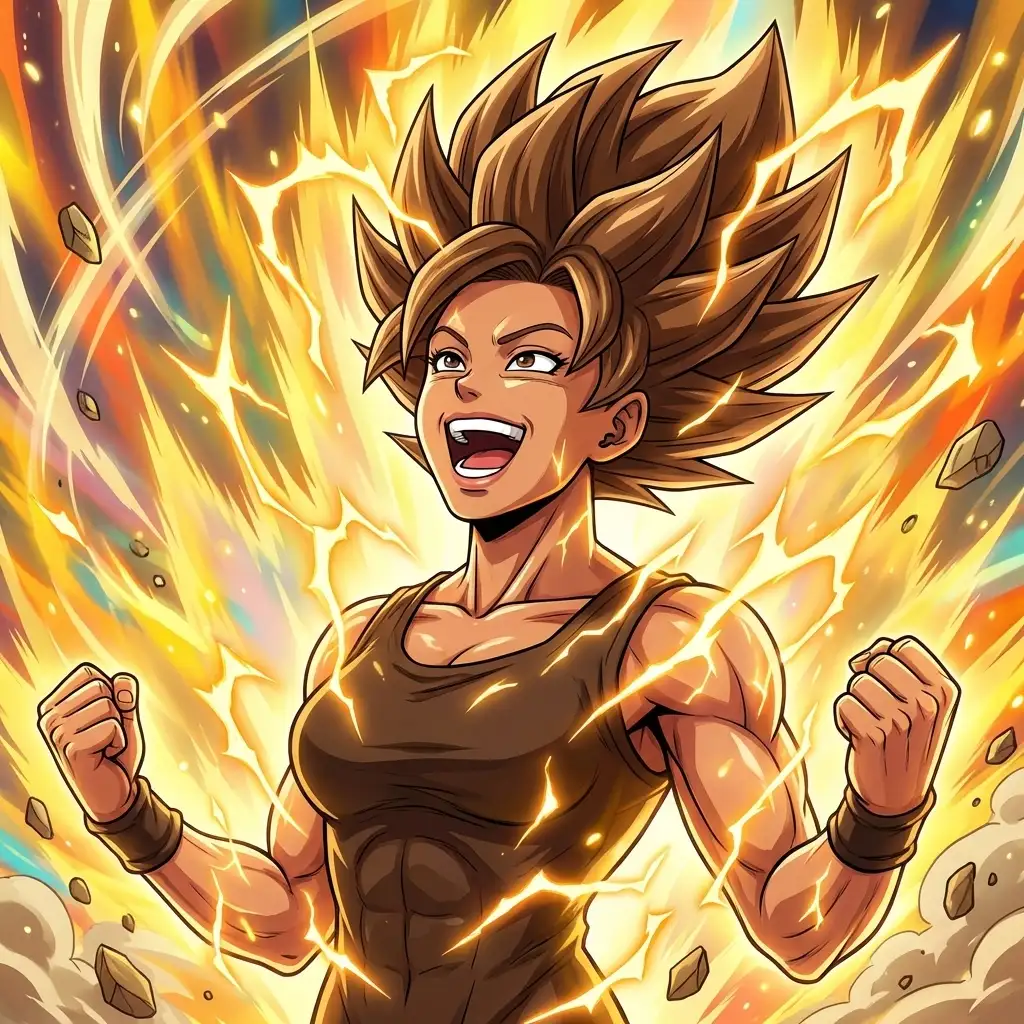
The Dragon Ball filter captures the iconic art style created by Akira Toriyama. Expect bold, clean outlines, vibrant saturated colors, muscular character proportions, and the signature spiky hair that Dragon Ball is known for. The AI adds subtle power-aura effects and the kind of dramatic lighting that appears during battle sequences. Skin tones are warm and slightly stylized, eyes are angular and intense, and the overall feel is one of strength and energy.
Dragon Ball's visual style is one of the most recognizable in all of anime, which makes it a powerful choice for social media. Even people who have never watched the show immediately recognize the aesthetic. Your Dragon Ball portrait will stop scrollers in their tracks.
Best for: Bold, high-energy profile pictures. Sports fans, fitness enthusiasts, and anyone who wants to project strength and intensity.
2. Naruto
The Naruto filter draws from Masashi Kishimoto's distinctive character design language. The style features softer lines than Dragon Ball, more realistic body proportions, and the elaborate eye designs that are central to the Naruto universe. The AI may add headband accessories, ninja-themed clothing elements, and the atmospheric lighting that characterizes Naruto's emotional scenes — warm golden tones for peaceful moments, cool blues and purples for intense ones.
Naruto's visual style balances action and emotion in a way that creates versatile portraits. The results look dramatic and detailed without being over-the-top.
Best for: Detailed, atmospheric portraits. Fans who appreciate character depth and want a portrait with emotional resonance.
3. One Piece
The One Piece filter captures Eiichiro Oda's utterly unique art style — exaggerated proportions, expressive faces, bold outlines, and a color palette that ranges from tropical brights to oceanic blues. One Piece characters have some of the most distinctive designs in all of manga, with elongated limbs, dramatic expressions, and clothing that tells a story about each character's personality and backstory.
The AI translates your features into Oda's style with impressive fidelity, creating portraits that look like they belong alongside Luffy and the Straw Hat crew. Expect wide, expressive eyes, dramatic grins, and the kind of dynamic energy that makes One Piece one of the best-selling manga series of all time.
Best for: Fun, expressive portraits with maximum personality. Social media posts designed to entertain and engage.
4. Jujutsu Kaisen
The Jujutsu Kaisen filter represents the darker, more mature end of the anime spectrum. The art style features detailed line work, muted and atmospheric color palettes (lots of deep blues, purples, and blacks), and a sense of tension and gravity that permeates every frame. The AI captures the show's characteristic contrast between shadow and light, creating portraits that feel moody, powerful, and aesthetically sophisticated.
This is the filter for people who want something that looks cool rather than cute. The Jujutsu Kaisen aesthetic has a fashion-forward quality that makes it popular as a profile picture even among people who are not anime fans — it simply looks striking.
Best for: Dark, stylish portraits. Users who want a cool, mature anime aesthetic without bright colors or exaggerated features.
5. Attack on Titan
The Attack on Titan filter draws from WIT Studio and MAPPA's dramatic visual approach. Expect sharp angular features, intense shadowing, military-inspired clothing elements, and the gritty, high-stakes atmosphere that defines the series. The color palette is dominated by earthy tones — browns, greens, grays — punctuated by dramatic lighting from above or behind.
Attack on Titan portraits have a cinematic, almost live-action quality that sets them apart from other anime styles. The line work is detailed and slightly rough, conveying the series' themes of struggle and determination. The AI may add Survey Corps-inspired costume elements or the distinctive three-dimensional maneuvering gear silhouettes that are iconic to the franchise.
Best for: Dramatic, cinematic portraits. Users who want intensity and a more realistic anime style.
6. Studio Ghibli
The Studio Ghibli style channels the warm, hand-painted aesthetic of Hayao Miyazaki's films. Soft watercolor-like backgrounds, gentle lighting, rounded character designs, and the kind of serene beauty that makes Ghibli films feel like animated paintings. This style is less about action and more about atmosphere — expect pastoral backgrounds, soft cloud-filled skies, and a color palette heavy on greens, warm yellows, and gentle blues.
Ghibli portraits have a quality of quiet beauty that makes them some of the most printable and frameable anime styles available. Many users have ordered canvas prints of their Ghibli portraits for their homes.
Best for: Gentle, beautiful portraits with a painterly quality. Users who appreciate art and want something that works as wall art.
7. Demon Slayer
The Demon Slayer filter captures ufotable's stunning blend of traditional Japanese art and modern animation. The defining feature is the use of dramatic color gradients and the characteristic breathing technique visual effects — swirling water, flame patterns, and other elemental designs that surround characters during combat. Expect vibrant, saturated colors contrasting with deep blacks, intricate pattern work on clothing, and the kind of visual spectacle that made Demon Slayer a global phenomenon.
This style produces some of the most visually spectacular portraits in the collection. The combination of traditional Japanese design elements with modern animation techniques creates images that are genuinely beautiful.
Best for: Visually spectacular portraits with color and energy. Users who want maximum visual impact.
8. General Anime ([Anime Me](/presets/anime-me))
The general Anime Me filter provides a versatile, style-neutral anime transformation that does not lock you into a specific series. It draws from contemporary anime aesthetics in general — clean lines, large expressive eyes, colorful hair possibilities, and the kind of idealized character design that makes anime portraits universally appealing.
This is the best starting point if you are not sure which specific style you prefer, or if you want a general anime look that is not associated with any particular franchise. The results are clean, polished, and work well as profile pictures across any platform.
Best for: Users who want a general anime aesthetic. Great as a starting point before exploring series-specific styles.
How AI Preserves Your Identity in Anime Form
One of the most impressive aspects of modern anime AI filters is how accurately they preserve your real identity while transforming you into a completely different art style. This is not trivial — anime characters have fundamentally different facial proportions than real humans. Eyes are larger, noses are minimized, jawlines are simplified, and hair has unnatural volume and color possibilities.
The AI navigates this translation by identifying and prioritizing your most distinctive features. If you have a prominent jawline, the AI preserves it in stylized form. If you have freckles, they appear as characteristic anime dot patterns. If your eyes are a striking color, the anime version amplifies that color for even more impact. Your hairstyle is translated almost exactly, gaining the volume and flow of anime hair while maintaining its fundamental shape and length.
This identity preservation is what separates professional AI anime filters from the early, crude versions that appeared in 2022–2023. Those earlier tools often produced generic anime faces that bore little resemblance to the source photo. Current models maintain enough of your real features that friends and family can immediately identify you in anime form — which is exactly what makes the results fun to share.
Best Photos for Anime AI Filters
Anime art emphasizes facial features, particularly eyes and hair. Your source photo should therefore prioritize clear visibility of these elements.
Eyes: Make sure both eyes are fully visible and in focus. Anime art is fundamentally about expressive eyes, so giving the AI clear, well-lit eyes to work with produces dramatically better results. Avoid squinting, looking away from the camera, or wearing sunglasses.
Hair: Your hairstyle is one of the most important elements of your anime portrait. Show your full hairstyle in the photo — do not crop too tightly. If your hair has interesting color, highlights, or texture, the AI will translate those details into anime form.
Expression: Anime characters are expressive. A smile, a confident look, or an intense gaze all produce more engaging anime portraits than a flat, neutral expression. Think about the kind of character you want to be — cheerful protagonist, mysterious antagonist, wise mentor — and express that in your photo.
Lighting: Anime art uses lighting dramatically, so starting with well-lit photos gives the AI more to work with. Side lighting creates dramatic anime portraits. Soft front lighting creates gentler, more Ghibli-like results. Experiment with different lighting to see how it affects your anime output.
Background: Simple backgrounds are best. The AI focuses its processing on your face and features, and a busy background can introduce visual noise. A plain wall, a blurred background, or a solid color all work well.
How Anime AI Filters Compare to Other Tools
Several apps and tools offer anime transformations, but they vary significantly in quality and approach.
Generic single-style tools apply one anime filter to every photo. The results are consistent but limited — you get the same look regardless of what you were hoping for. These tools are adequate for casual use but frustrating for anime fans who want a specific series' aesthetic.
Art style transfer tools (like Prisma or similar) apply general artistic styles to photos but are not specifically trained on anime. The results look like filtered photographs rather than genuine anime character portraits. They lack the fundamental restructuring of facial proportions and design that makes anime AI filters convincing.
Dedicated anime AI generators (like immagenAI) use models trained specifically on anime art. The results look like actual anime characters rather than filtered photos. The key differentiator is whether the tool offers series-specific styles or just a single generic anime option.
Mobile apps (like Meitu or Snow) offer anime filters as part of a broader filter collection. The quality has improved significantly but tends to be less detailed and customizable than web-based tools that specialize in AI portrait generation.
The best results consistently come from tools that offer dedicated, series-specific anime models and process images through full generative AI rather than style transfer. The difference in output quality is immediately visible when you compare them side by side.
Your Anime Portrait Awaits
Whether you are a lifelong anime fan who grew up watching Dragon Ball Z after school, a newer fan drawn in by Jujutsu Kaisen and Demon Slayer, or simply someone who appreciates the anime aesthetic and wants to try something visually striking, the anime AI filter collection has a style for you.
Start with the series that resonates most with you, or try the general Anime Me filter to see yourself in anime form before committing to a specific franchise. With two free transforms per day, you can explore a different anime style every day for a week and find your perfect match.
The anime community on social media is one of the most engaged and enthusiastic audiences online. Sharing your anime portrait with the right hashtags can introduce you to a passionate community of fans who appreciate the art form as much as you do.
Ready to see yourself in anime? Start with the Dragon Ball filter for maximum impact, the Naruto filter for atmospheric depth, or the Anime Me filter for a versatile starting point.
After creating your anime portrait, boost it across anime fan communities with targeted social tools — anime content consistently outperforms other visual content in engagement rates. And when you need your portrait sized for every platform — from a Discord avatar to a Twitter banner — Klara handles anime image resizing and optimization in a single click.